Start here: TradeWarden in 3 steps
About 2 minutesYou need MetaTrader 5 on a Windows PC or VPS, logged in to the account you bought TradeWarden for.
1
Put TradeWarden in MetaTrader 5
- In MetaTrader 5, click File → Open Data Folder.
- Open MQL5 → Experts and copy TradeWarden.ex5 into it.
- Back in MetaTrader, in the Navigator (Ctrl+N), right-click Expert Advisors and click Refresh. TradeWarden appears in the list.
2
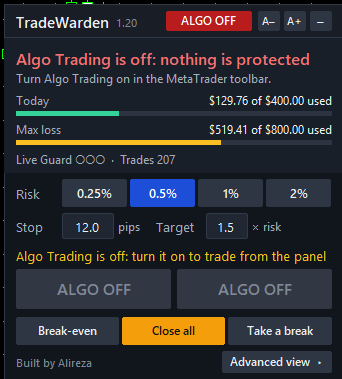
Turn on Algo Trading
- Click Algo Trading in the toolbar so it turns green. Without it nothing can protect you, and the panel says ALGO OFF.
3
Attach it and answer one question
- Drag TradeWarden from the Navigator onto one chart, and click OK.
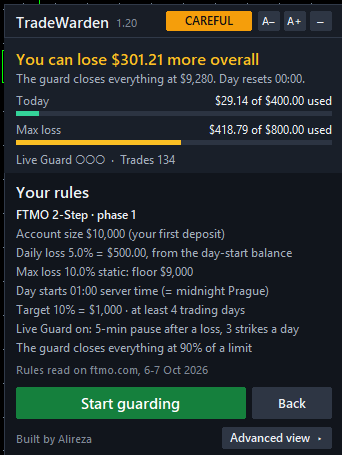
- The panel asks which account this is. Pick your firm and your phase, or My own rules.
- Check the rules it shows you, then click Start guarding.
✓
That's it. You're guarded.
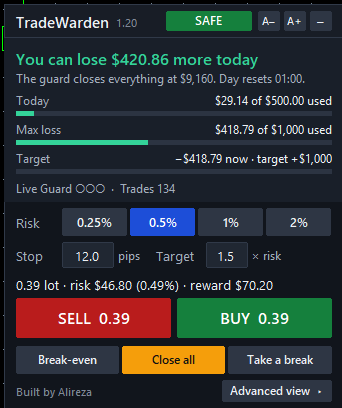
- The top line tells you how much more you can lose today. The pill says SAFE, CAREFUL, WAIT, PAUSED, BREAK or LOCKED.
- Trade from the panel: pick your risk and stop, and SELL or BUY shows the lot.
- After a loss the Live Guard makes you wait 5 minutes. Feeling it slip? Click Take a break.
Good to know
- Keep MetaTrader 5 running. TradeWarden only acts while MT5 is open. For a funded account, use a VPS.
- One chart is enough. The loss limits watch the whole account.
- Try it on a demo first if you like: your firm's rules work the same there.
- Alerts on your phone: in Tools → Options → Notifications, enter the MetaQuotes ID from the MT5 mobile app.
If something looks wrong
- "This TradeWarden licence is for other accounts": the file runs only on the account numbers you bought it for. A new account is free to add; see below.
- ALGO OFF on the panel: turn on Algo Trading (step 2).
- TradeWarden is not in the Navigator: check the file is in MQL5 → Experts, then right-click Expert Advisors → Refresh.
New account number?
Phase 2, a funded account or a new challenge: it's free. On your order page, click Change an account, type the new number, and a new file is ready there within minutes. Up to two accounts at a time.
Your 30-day guarantee
If TradeWarden doesn't enforce a rule you set within 30 days, send us your order number and that day's journal (MQL5\Files\TradeWarden), and you get your USDT back. Not covered: price moving past a limit between two ticks, and MT5 closed or Algo Trading off.
Your download also has README.md (every setting), TEST-REPORT.md (every test) and the Prop-Rules-Pack folder (7 firm presets). Questions? Use Message us on your order page. Built by Alireza.